DeskSpace
A dual arm is useful only if both screens can occupy their required positions on the actual desk. A moderate combined weight does not settle that question: the retained F8LD table gives a minimum as well as a maximum for each arm, and it distinguishes clamp from grommet mounting.
Use those reference limits to rule out a mismatch, then identify the offered unit and its matching instructions. The retained F8LD table does not establish a currently orderable SKU.
Separate F8LD from the similar names
| Manufacturer reference | What the source identifies | What it does not settle |
|---|---|---|
| Retained US dual-mount page | Separate D5D and F8LD specification sections; separate F7D and F8LD downloads. | The relationship between D5D and F7D, or the exact revision in a present offer. |
| Current accessory-combo text | A dual-monitor description named F7D. | A numerical F8LD limit or identity for the current box. |
| Single-mount page | The page describes and tabulates single-arm F7. | A dual F8LD substitute; F8L in a URL is not F8LD. |
The May 24, 2021 manufacturer article uses D5D/F8LD link text leading to the retained dual page. That is historical naming evidence, not a current sale or configuration record. Do not rename the separate D5D table F7D to make the sources agree.
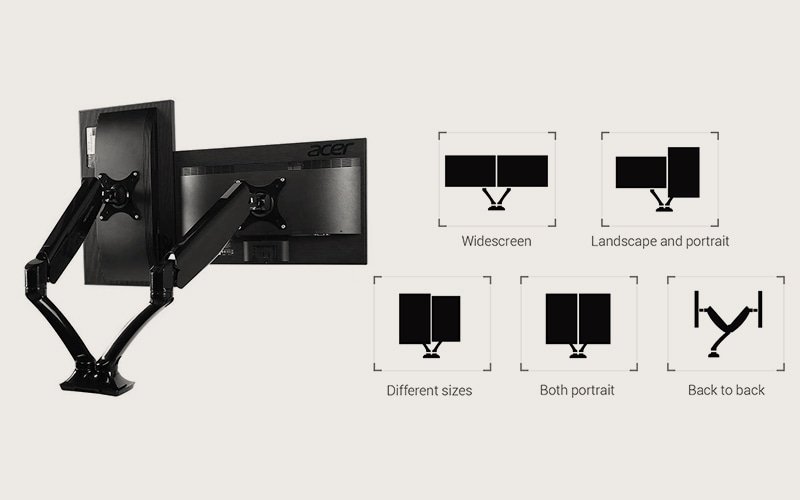
The existing photograph remains a manufacturer-bundle F8LD reference. The current combo text naming F7D does not relabel that image or prove that an offered arm matches it.
Apply the F8LD-labelled limits to each screen
Use the F8LD section of the dual-mount page, checked October 13, 2026. Its minimum and maximum load apply to each arm, alongside the separate screen and mounting-pattern fields. A combined weight for the pair cannot establish that both individual displays qualify.
The clamp and grommet routes have different documented requirements. Passing one thickness field does not validate the other fixing method, the desk's material or its edge construction. The page's maximum-height and extension fields also lack a clearly explained datum in the retained HTML; they cannot establish a floor-to-screen position or simultaneous reach for both arms.
A lighter screen can rule out the pair
Imagine a pair in which one display sits below the F8LD minimum even though the other is within the documented range. The combined weight does not repair the individual failure. Keep the stands while looking for an identified arm whose applicable range includes each display. Do not add weight to a screen to make it match a specification.
In the same proposed setup, a clamp thickness check might pass while the grommet route does not. Do not treat a suitable-looking edge as approval to drill elsewhere. The complete fixing route needs its own matching instructions.
This hypothetical case makes no claim about real screens, arm reach or desk strength. For a different pair that meets the individual fields, continue to the mounting plates, adapters, screen curvature and depth, top construction and actual movement. A published range alone does not approve a curved display or an installation.
Choose the arrangement before replacing the stands
Ask what the second screen contributes to the work, then record both outer sizes and required positions. The dual-monitor versus ultrawide planning guide helps compare that layout without turning diagonal size into useful desk width.
Once the mount is identified, trace cables through the intended screen movement and the desk's seated-to-standing travel using the cable-routing guide. Reach, sag, vibration and adjustment effort have not been measured for this F8LD reference.
If the seller cannot identify the arm and matching manual, retaining the stands or researching another documented mount is a usable outcome. No current stock, replacement equivalence or hardware-performance ranking is established here.
Sources and document limits
Manufacturer HTML references were checked on October 13, 2026, including cached retrievals. They establish labelled reference fields, not an orderable F8LD revision.
- FlexiSpot retained dual page — the per-arm and fixing distinctions use its F8LD-labelled table only.
- FlexiSpot F7 single page — identifies the single-arm destination separately.
- FlexiSpot accessory-combo page — current text names F7D without a numerical dual-arm table.
- FlexiSpot historical D5D/F8LD article — naming/path context only; obsolete sale details are excluded.
The linked F8LD Manual, F8LD Tech Drawing, F7D Manual and F7D Tech Drawing were inaccessible. The linked F7 manual was detected as a PDF with no extracted text returned; its page contents were not read. No bolt, adapter, assembly or movement-limit detail is taken from those five documents.
Illustrated configuration: FlexiSpot official source. F8LD dual-monitor arm shown in the manufacturer accessory bundle. Verify the current SKU and monitor limits before buying.
About this guide: An editorial research profile, not an individual reviewer. Explains model specifications, configuration choices and the limits of manufacturer evidence. Editorial profile
Keep planning your workspace.
Use the sources and related guides to choose your next step.
Explore desk essentials →