Standing desks · Comparison
UPLIFT V3 vs Secretlab MAGNUS Pro: desktop choices and cable access
Make room for your working day by choosing how the desktop, controls and connections should come together.
The quick decision
Which option fits your day?
Choose UPLIFT V3 when you want to select the desktop material and controller, then arrange cable storage around your equipment. Choose MAGNUS Pro when power through the leg and top access to the rear tray are the changes you want most. Confirm mounts, included parts and your completed setup before ordering.
UPLIFT V3
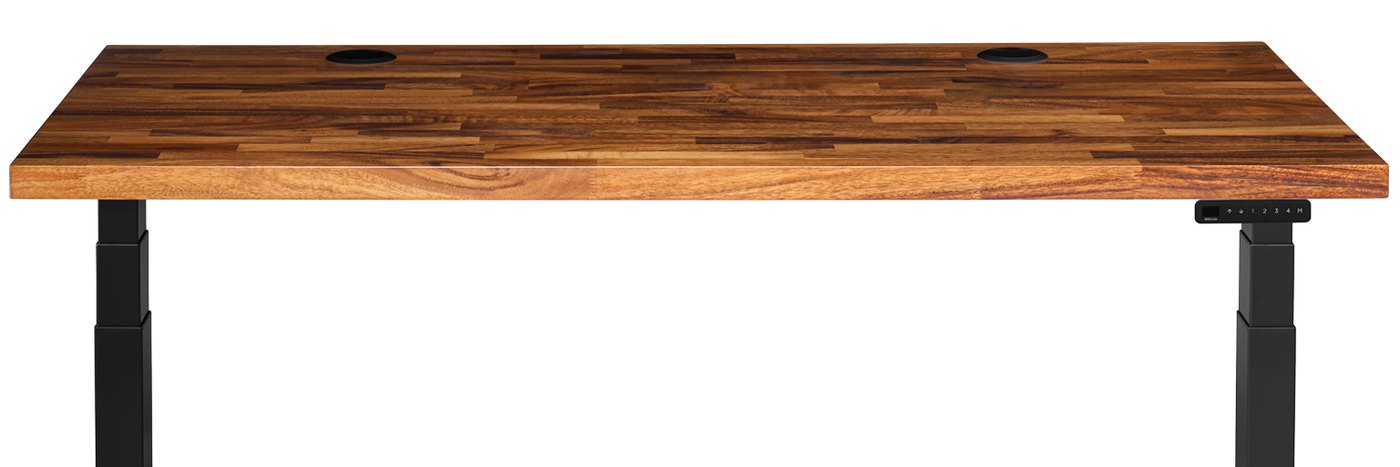
Choose the surface and controller you want, then position the included cable storage around the setup.
Secretlab Magnus Pro
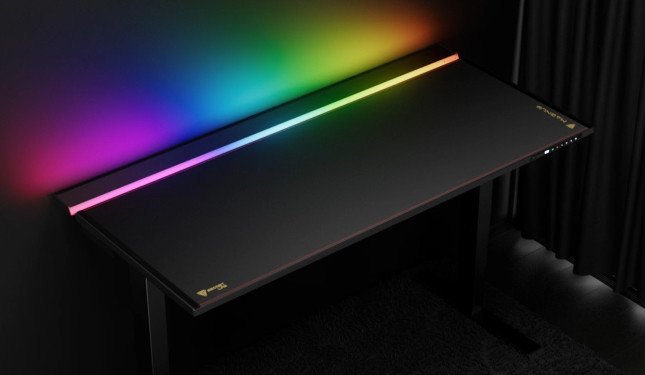
Give power a route through the desk leg and keep rear connections accessible from above.
- V3 still needs a plan for the power strip and route to the wall outlet
- MAGNUS Pro mounts and equipment must leave its rear cover usable
Research-based guide. DeskSpaceLab has not tested these products head to head. Sources and review scope
You want to put down a notebook, connect the laptop and start the day without shuffling a nest of adapters. You may also want the desk to belong in the room, whether that means a wood surface beside the bookcase or a coordinated metal setup around the screens.
UPLIFT V3 makes the desktop and equipment choices central. MAGNUS Pro makes power routing and access to connections part of the furniture. Both provide cable storage; the decision is which approach solves more of your everyday friction.
UPLIFT V3: begin with the desk you want to look at
UPLIFT offers laminate, bamboo and wood desktop options. That gives you a reason to start with V3 if the surface is a lasting part of the purchase: the place where you write, set down a mug and arrange the things you want nearby.
The controller is another real choice. The Basic option requires you to hold the control while the desk moves; Advanced options provide stored positions. If returning to a chosen setting is part of your routine, select the controller that supplies it rather than assuming every V3 order includes the same controls.
V3 also includes FlexMount cable management. This is an adjustable pouch beneath the top, with supports that can move to help work around an attachment such as a monitor-arm clamp. You can plan a place for the power strip and adapters as part of the desk you configure. Another cable basket is not automatically a necessary purchase.
The flexibility comes with decisions: choose a compatible installation, organize the power strip and plan the path to the wall outlet. A wood top and an adjustable pouch do not make every existing mount suitable.
Affiliate link: we may earn a commission on qualifying purchases.
MAGNUS Pro: give power a route through the desk
MAGNUS Pro brings power through a leg to a socket at the desktop. The rear tray then gives the remaining leads and adapters somewhere to go. That connection between floor, desk and equipment is the reason to consider it if organizing power is the part you most want resolved by the furniture itself.
The tray's hinged cover opens from above. If you change a charger or add equipment, you can return to that connection area without relying on underside access. Keep its opening clear when planning screens and mounts; the cover is not a mounting or load-bearing surface.
Its magnetic metal desktop and coordinated accessories offer another way to assemble the workspace. This is a more defined surface choice than V3's material menu. Explore it because that arrangement appeals to you, and check which mat, mounts and routing accessories your order actually includes.
View Secretlab Magnus Pro at Secretlab
Manufacturer link, not an affiliate link.
Picture connecting the laptop at the start of the day
Imagine keeping a monitor, notebook and charger on a desk in a shared living space. You want a clear writing area and somewhere permanent for the adapter, but you also care about how the furniture looks when work ends.
With V3, you might choose a wood surface, a controller with stored positions and a FlexMount location that leaves your monitor clamp room. The adapter goes underneath; you arrange the power strip and its lead to the outlet. V3 makes sense here because the desired surface and configuration justify those choices.
With MAGNUS Pro, the attraction is the planned power route and rear connection area. You would arrange the adapter in the tray and leave the hinged cover accessible for later changes. Pro makes sense if avoiding a separate route for the wall connection matters more than choosing a wood top.
Neither desk removes the laptop's connecting lead. The useful difference is what happens around it. For this buyer, a strongly preferred desktop material points toward V3; a strongly preferred power-and-tray arrangement points toward Pro. If the existing monitor arm cannot fit safely, its replacement becomes part of either decision.
Check the complete setup, not just the desktop
Leave room for the chair to approach and for cables to move with the desk. Follow FlexMount's mounting instructions for the selected top. On MAGNUS Pro, a computer mounted beneath the desk can restrict how far the completed setup lowers, and the rear cover must remain usable.
Compare the actual orders you would place, including controller, mounts, delivery and assembly. UPLIFT's options were not checked in a completed cart, and an attractive manufacturer's setup can include separately purchased accessories. Confirm return shipping, packing and disassembly responsibilities with the seller before buying.
Choose a different route if the main problem is smaller
If integrated power interests you but the Pro surface or top-opening tray does not, MAGNUS Pro vs Evo compares the alternatives within Secretlab's range. For another configurable standing desk, V3 vs FlexiSpot E7 Pro considers a different pairing.
If the present desk already fits your room and working positions, start with the cable-management guide. Rehousing the adapters may be enough. Replace the furniture when V3's choices or Pro's integration solve something you want to change about the whole setup.
Sources and review scope
US scope: UPLIFT V3 C-frame and MAGNUS Pro standard/XL. The V3 frame specification and FlexMount instructions were read October 29, 2026. Desktop, controller and included-FlexMount claims use manufacturer's indexed V3 product-page excerpts checked that day; the full live configurator could not be retrieved. No selected cart was verified.
The MAGNUS Pro page, Secretlab FAQ and relevant cable, mounting and rear-cover guidance in the Pro manual were reviewed October 29, 2026. Prices, availability and contractual return terms were not verified. These sources establish advertised features and setup requirements. DeskSpaceLab has not tested either desk or ranked their stability, noise or durability.
About this guide: DeskSpaceLab Comparisons · Our editorial approach and affiliate policy