Standing desks · Buying guide
FlexiSpot AlcoveRiser M7: can it work with the desk you have?
Keep a suitable existing desk while raising the screen and inputs you actually use. The lowered keyboard position is the deciding check.
The quick decision
Is it right for your day?
Choose an identified M7 when keeping your desk matters and the complete screen-and-input arrangement works seated and standing. Reconsider it when the extra platform leaves the keyboard too high or a needed display below.
- Upper-platform rise does not establish the lowest keyboard position
- Size, host suitability and each platform load need separate checks
Research-based guide. DeskSpaceLab has not tested this product. Sources and review scope
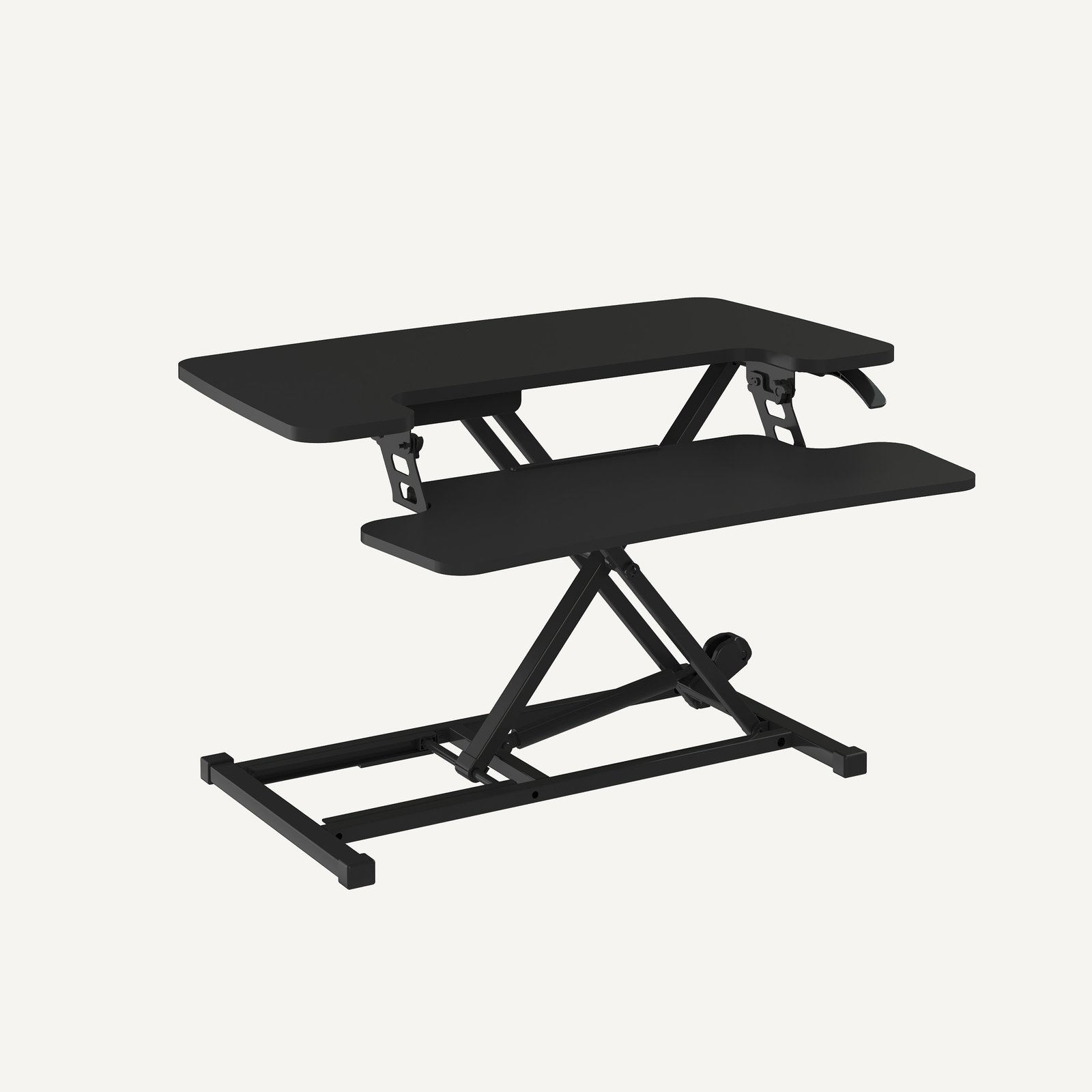
A desk you like does not necessarily need replacing just because you want to stand for part of the day. FlexiSpot's AlcoveRiser M7 family lifts selected equipment above an existing surface, keeping the furniture while changing where the work happens.
Consider it when the host desk supports the converter properly and both the screen and input devices can reach useful positions. If the keyboard is already too high when seated, putting another platform above the desk may preserve the problem. That is a reason to reconsider the arrangement before buying.
Keep the furniture, move the equipment that matters
The current M7 family uses a manual gas-spring lift and a separate keyboard platform. Its vertical X-shaped lifting arrangement is intended to raise the working platforms while keeping the converter on the host surface. This differs from replacing the entire desk with a powered frame.
The separate platform gives a keyboard and pointing device their own location below the display surface. That can make the arrangement more coherent than raising a screen while leaving the inputs behind. It does not guarantee the right relationship for your body, monitor stand or keyboard.
Start with the objects needed for the task. A laptop that stays on the original desk cannot also become a raised standing display. If you need its screen as well as an external monitor, decide where both will be during standing work. Avoid buying the converter around a photograph that leaves out a device you use every day.
A seated desk that also hosts standing calls
Imagine someone with a serviceable desk who wants to stand during calls while reading documents and typing short notes. The converter is worth considering if the screen, keyboard and pointing device can rise together, with cables following the movement and the host surface properly supporting the base.
Now change one detail: the person's laptop remains below because the upper platform is occupied. If that laptop is the main display for the call, the arrangement has not solved the task. An external display or different layout would need its own compatibility check. This is our hypothetical planning case; no matched independent original review was established for the selected M7 configuration.
The useful choice is therefore to keep the furniture only when the entire working arrangement works. A converter is not automatically the simpler option once missing equipment and compromises are included.
View FlexiSpot AlcoveRiser M7 at FlexiSpot
Manufacturer link, not an affiliate link.
Check the seated position before the standing one
A converter remains on the desk when lowered. Confirm that its keyboard platform still allows the seated position you want, with room for the chair to approach. A suitable upper-screen position does not settle the lower input position.
Also check the exact platform limits separately. A generous allowance for the upper platform cannot be reassigned to the keyboard tray. We have not verified effortless one-handed movement with a loaded setup. If movement effort is central to your choice, obtain guidance for the exact converter and equipment rather than assuming the gas spring makes every load equally easy.
A monitor arm introduces another question: approval for its mounting location and load path. Confirm both the converter and host desk before attaching one. The photograph identifies a black M7-family converter, not a certified platform size or approved arm installation.
When replacing the desk is more useful
If retaining the furniture requires awkward screen placement or an unsuitable seated keyboard position, compare a complete desk change using the FlexiSpot desk family guide. If the current layout is close to working, the desk-height guide can help identify which position actually needs changing.
The seller link opens the M7 family, not a preselected M27SB bundle. Match the selected converter and its instructions; do not substitute M7B, M7L or powered EM7L documentation indiscriminately. Confirm return eligibility and handling requirements before relying on a home trial.
Sources and review scope
The AlcoveRiser M7 family page was read October 29, 2026. Its selected small-size tab linked the M27SB manual, but extraction produced almost no useful text. This update does not claim a newly verified handling manual. Earlier platform-limit evidence retains its October 12 date.
This is documentary analysis without a DeskSpaceLab lifting, stability or personal-fit test. The existing FlexiSpot photograph and attribution are retained; exact selected equipment and current return terms remain order-specific checks.
About this guide: DeskSpaceLab Product Research · Our editorial approach and affiliate policy